There is a distinct, universal stomach-drop moment known to almost every traveler. It usually happens a week or two after you return home from an incredible trip. You open your banking app or your email inbox, look at your monthly phone bill, and see a number that looks like a typo.
Except it isn’t. It’s international data roaming.
For years, major domestic mobile carriers have treated overseas data like a luxury commodity. They charge eye-watering daily rates just to let you check Google Maps or send a photo to a family group chat. If you don’t opt into their specific “travel passes”—which still routinely cost $10 to $15 a day—they hit you with pay-as-you-go per-megabyte rates that feel borderline criminal.
Getting reliable, cheap internet for travel shouldn’t require a finance degree or a willingness to be fleeced. Today, the travel landscape has evolved, and you have real options. Let’s look honestly at how international roaming traps you, what your alternatives are, and how you can keep your phone connected abroad without spending a fortune.
The True Cost of “Convenient” Carrier Roaming
Domestic phone companies love to market their international roaming packages as the easiest way to travel. You get off the plane, turn your phone on, and it just works.
But that convenience comes with a massive premium. Let’s look at a typical two-week vacation in Europe or Asia.
- The Daily Pass Trap: If your carrier charges $10 a day for an international pass, a 14-day trip costs you an extra $140 on top of your normal phone bill. If you are traveling as a couple or a family, multiply that by two or three.
- The Fine Print Speed Caps: What many people don’t realize until they are actually trying to book a ride-share vehicle on the street is that these daily passes often throttle your speed. You might get 500MB or 1GB of fast data, and then your speed drops to an absolute crawl for the rest of the day.
- The “Accidental” Roaming Charge: Even if you plan to rely entirely on public Wi-Fi, if you forget to turn off data roaming in your settings, background apps will sync, emails will download, and you can rack up dozens of dollars in charges before you even leave the airport arrival terminal.
If you want truly cheap internet for travel, you have to stop relying on your home carrier’s default settings.
The Contenders: Local SIMs vs. Pocket Wi-Fi vs. eSIMs
To avoid the roaming trap, travelers generally choose between three main methods to get data overseas. Each has its place, but they are far from equal when it comes to cost and convenience.
1. Local Physical SIM Cards
For a long time, the gold standard for budget travelers was walking up to a kiosk at the airport, handing over a passport, and buying a local physical plastic SIM card.
- The Reality: Local SIMs usually offer the absolute cheapest per-gigabyte rates because you are buying directly from local networks (like Vodafone in Europe or Globe in the Philippines).
- The Friction: You have to find a physical store, sometimes queue for a long time after a tiring 12-hour flight, deal with language barriers, and find a tiny paperclip to pop out your home SIM card. Then, you have to carefully store your domestic card somewhere safe without losing it. Furthermore, many countries now have strict registration laws requiring passport photos and local verification, meaning your data might not activate immediately.
2. Pocket Wi-Fi Routers
Commonly rented at airports across East Asia (like Japan and South Korea), these are portable puck-sized devices that broadcast a local Wi-Fi signal for your phone and laptop.
- The Reality: They are great if you are traveling with a group or need to connect multiple devices like laptops and tablets simultaneously.
- The Friction: It’s one more device you have to keep charged. If the pocket Wi-Fi dies, everyone loses internet access. You also have to worry about picking it up on arrival and returning it before your flight home, otherwise you face steep penalty fees.
3. Travel eSIMs
An eSIM (embedded SIM) is a digital profile downloaded directly onto your phone’s internal chip. You buy a data plan online, scan a QR code, and it functions just like a local SIM card without the physical plastic.
- The Reality: You can buy and install a plan while sitting on your couch at home or using airport Wi-Fi. The moment you land, you switch the digital line on, and you have internet for travel instantly.
- The Friction: Your phone must be carrier-unlocked and compatible with eSIM technology (most major smartphones made after 2019 are, but older budget models might not be). It is also a data-only solution in most cases, meaning you won’t get a traditional local phone number to make standard analog phone calls—though you can still use WhatsApp, FaceTime, and maps perfectly.
A Direct Comparison of Popular eSIM Options
If you decide to go the digital route, navigating the marketplace can be confusing. Big names like Airalo and Holafly dominate travel blogs, alongside providers like Nomad, Ubigi, and newer platforms like Terminal eSIM.
They all provide data, but their business models are quite different:
| Provider | Data Model | Best For | Things to Note |
| Airalo | Fixed Data Tiers (e.g., 1GB, 3GB, 5GB) | Short trips, light users | Can get expensive if you need to constantly top up large amounts of data. |
| Holafly | Unlimited Data Plans | Heavy users, peace of mind | Often significantly more expensive upfront; you cannot share data via hotspot/tethering on many of their plans. |
| Nomad | Mixed Data Packs | Short to mid-range regional travel | App interface is clean, but network coverage can vary depending on local carrier partnerships. |
| Terminal eSIM | Transparent Fixed Pricing & Global Profiles | Balanced budget travelers, regional multi-country hops | Focuses on direct provider networks for consistent speeds rather than just being a marketplace aggregator. |
The key to securing cheap internet for travel is matching the provider to your actual consumption habits. If you just need to check directions and send text messages, buying an expensive “unlimited” plan from Holafly is an unnecessary drain on your wallet. On the flip side, if you are a remote worker uploading video files, buying tiny 1GB chunks from Airalo will frustrate you.
Why Travel eSIMs Are Winning the Budget Debate
For the vast majority of independent travelers, an eSIM strikes the best balance between local rates and modern convenience. Let’s look closer at the practical advantages and limitations of relying on an eSIM for your data needs.
The Pros:
- No More Swapping Pieces of Plastic: You don’t have to keep track of a tiny piece of plastic or worry about dropping your home SIM card down an airport floor grating.
- Keep Your Main Number Active: Dual-SIM technology allows your phone to keep your primary home number active for important text messages (like 2-factor authentication bank codes) while routing all heavy internet data through your cheap travel eSIM.
- Buy Before You Fly: You can buy a plan for your destination country before you ever board the plane. When you touch down and the flight attendants say you can use your phones, you are already online.
- Regional Flexibility: If you are backpacking through Central Europe or taking an island-hopping trip across Southeast Asia, you don’t need to buy a new SIM card in every single country. Regional eSIM plans cover dozens of countries seamlessly on a single download.
Things to Know:
- Data-Only Limits: Most travel eSIM options do not include an analog phone number for local calls or standard SMS messages. If you need to call a local restaurant to make a reservation, you will need to look for an alternative option like using WhatsApp, Skype, or using your hotel phone.
- Device Restrictions: If your phone is still on a monthly installment payment plan with your home network carrier, it might be locked. A locked phone will reject any eSIM from another company. Always check with your provider to ensure your device is unlocked before purchasing a plan.
- Technical Setup Check: While installation is generally a simple matter of scanning a QR code or following a few taps in an app, it still requires a stable internet connection (like your home Wi-Fi) to set up initially. Trying to activate one in a remote area with zero signal is a recipe for headache.
Real Travel Scenarios: How Much Data Do You Actually Need?
One of the biggest mistakes travelers make when hunting for cheap internet for travel is overestimating their data usage and buying plans that are far too large.
Pro-Tip: Turn off automatic background app refreshes and photo cloud syncing over cellular networks when traveling. This prevents your phone from silently devouring your data cap while it sits in your pocket.
Here is a look at how data translates to real-world travel scenarios:
- The Weekend City Hopper (1GB – 3GB): If you are spending 3 to 4 days in a city like London or Tokyo, a basic 2GB or 3GB plan is usually plenty. This allows you to use navigation apps constantly, lookup restaurant reviews, and order ride-shares without running out.
- The Two-Week Vacationer (5GB – 10GB): For a standard two-week holiday involving casual social media posting, occasional music streaming on trains, and frequent navigation, a 5GB or 10GB plan offers a safe cushion without paying for excessive waste.
- The Remote Worker / Digital Nomad (20GB+ or Unlimited): If you are opening a laptop to work from local coffee shops, taking regular Zoom calls, or uploading high-definition video content to social platforms, you will want to look at large high-tier data packages.
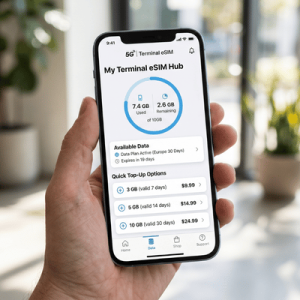
Platforms like Terminal eSIM make it easy to see exactly what you are paying for upfront, allowing you to select small chunks and top up directly through an app if you happen to use more data than you originally expected.
Frequently Asked Questions About Internet for Travel
Can I still use my WhatsApp account if I install a travel eSIM?
Yes. Your WhatsApp account is linked to your telephone number, not the physical SIM card inside your device. When you install an eSIM for data, WhatsApp will prompt you with a message asking if you want to keep your existing number. Simply select “Keep” and your chats, contacts, and calls will work exactly as they do at home.
How do I know if my smartphone is compatible with an eSIM?
As a general rule of thumb, if you have an Apple iPhone XR or newer, a Samsung Galaxy S20 or newer, or a Google Pixel 3 or newer, your phone supports eSIM technology. You can double-check by going to your phone settings under “About Phone” or “Cellular” and looking for an EID number.
Should I activate my travel eSIM before I leave or when I arrive?
It is always highly recommended to handle the installation process while you are still at home on your own stable Wi-Fi network. You can install the profile days in advance; the actual data package and time validity window won’t start counting down until your phone physically connects to the supported local partner network at your destination.
Conclusion: Stop Paying the Roaming Tax
International travel is expensive enough without handed-over hundreds of dollars in needless connectivity fees to your domestic phone company. Securing cheap, high-speed internet for travel has never been simpler, thanks to digital alternatives.
Before your next trip, take five minutes to verify that your smartphone is carrier-unlocked. Skip the expensive daily carrier passes, bypass the long physical SIM card lines at the airport arrivals terminal, and check out straightforward digital data options. By using a dedicated travel platform like Terminal eSIM, you can tailor a data plan to your specific itinerary, keep your budget intact, and focus your travel funds on what actually matters—enjoying the destination.