Few things match the feeling of landing at Dubai International Airport (DXB), walking past the massive queues at the terminal kiosks, and watching your phone instantly pick up a 5G signal while you head straight for the taxi line.
If you are still traveling with a physical paperclip to swap plastic SIM cards, you are doing it the hard way. Dubai is a city built on futuristic tech, and its digital infrastructure reflects that. Setting up a digital data plan is now the easiest way to hit the ground running.
This guide skips the fluff and walks you through exactly how to set up an esim dubai plan in under five minutes, balancing the pros, the strict local regulations, and the honest limitations you need to know before you fly.
Why Use an eSIM in Dubai?
For years, the standard arrival ritual in the United Arab Emirates (UAE) involved waiting in a 20-minute line at a du or e& (formerly Etisalat) counter, handing over your physical passport, waiting for a retail agent to scan it, and inserting a piece of plastic into your phone.
While the major UAE networks still offer “free” visitor physical SIM cards with a tiny amount of complimentary data (usually around 1GB valid for 24 hours), they monetize heavily on the upsells. The moment that free gigabyte expires, the top-up rates at airport counters are notoriously expensive.
Choosing a digital alternative means you can browse local packages, complete your purchase while sitting at your departure gate, and switch your data line on the moment your flight lands.
 United Arab EmiratesUnited Arab Emirates 1GB 7DaysBuy now
USD 6.00
- United Arab EmiratesUnited Arab Emirates 3GB 30DaysBuy now
USD 10.00
- United Arab EmiratesUnited Arab Emirates 5GB 30DaysBuy now
USD 16.20
- United Arab EmiratesUnited Arab Emirates 10GB 30DaysBuy now
USD 25.00
- United Arab EmiratesUnited Arab Emirates 20GB 30DaysBuy now
USD 37.00
- United Arab EmiratesUnited Arab Emirates 50GB 180DaysBuy now
USD 157.50
The Step-by-Step 5-Minute Activation Guide
Setting up an eSIM is incredibly straightforward, but the order of operations matters. The number one mistake travelers make is trying to activate their plan using sketchy airport Wi-Fi. Follow these steps to ensure a flawless setup.
Step 1: Verify Device Compatibility
Before spending a single dollar, make sure your smartphone can actually use digital SIM profiles. Generally, if you have an iPhone XR or newer, a Google Pixel 3 or newer, or a Samsung Galaxy S20 or newer, you are good to go.
⚠️ Crucial Check: Your phone must be carrier-unlocked. If you are on a monthly payment plan with your home network provider (like Verizon, AT&T, or Vodafone), they often lock your device’s hardware, preventing it from accepting secondary digital profiles. Dial *#06# on your keypad; if an EID number pops up on your screen, your phone supports digital profiles.
Step 2: Choose Your Provider and Plan
There are two main routes you can take:
- International Digital Marketplaces: Providers like Airalo, Holafly, Nomad, and Ubigi offer prepaid data lines tailored for tourists. Alternatively, our app, Terminal eSIM, streamlines this by acting directly as the provider. We focus on building direct network profiles, which removes the typical middleman markup and results in highly stable connections.
- Local UAE Mobile Operators: You can purchase an eSIM directly from local providers like e& (Etisalat), du, or Virgin Mobile UAE via their official websites or apps.
Step 3: Purchase and Download (Do This Before You Fly)
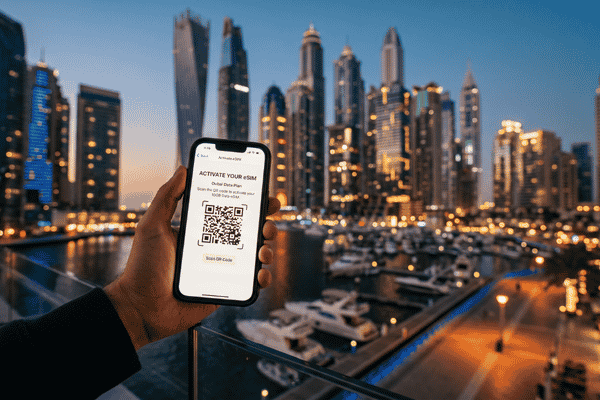
Buy your package while you still have a stable internet connection at home or at your departure airport. Once purchased, you will receive a confirmation email containing a QR code or an activation code.
Step 4: Scan and Install the Profile
Open your phone’s cellular settings:
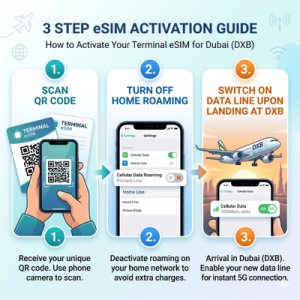
- For iOS: Go to Settings > Cellular > Add eSIM and scan the QR code.
- For Android: Go to Settings > Network & Internet > SIMs > Add SIM and scan the QR code.
Label the new profile something clear, like “Dubai Data,” and keep it turned OFF until you travel.
Step 5: Switch It On Upon Landing
When your flight touches down at DXB or Al Maktoum International (DWC), open your cellular settings, turn your new digital data line ON, and set it as your primary line for Cellular Data. Make sure to turn Data Roaming on for this specific profile, while keeping your home SIM card’s data roaming completely disabled to avoid surprise bills from your carrier back home.
Pros vs. Things to Know
Every connectivity option has its trade-offs. To help you decide if a digital profile fits your travel style, here is a balanced look at the benefits and limitations.
The Pros
- Zero Wait Times: You completely bypass the physical retail kiosks at the airport, allowing you to walk straight to immigration and the taxi queues.
- Keep Your Home Number Active: Dual-SIM functionality allows you to keep your regular physical SIM active for important two-factor authentication (2FA) bank texts and emergency calls, while using the local digital profile strictly for cheap data.
- No Hidden Fees: Prepaid digital packages are entirely transparent. You pay upfront for a set amount of gigabytes, meaning there is zero risk of returning home to accidental roaming charges.
Things to Know (The Honest Truth)
- Data-Only Limits: Most international third-party profiles (including standard plans from Airalo or Nomad) are data-only. They do not provide a local +971 phone number, meaning you cannot make traditional cellular voice calls or send standard SMS texts.
- The VoIP Block in the UAE: This is the most critical factor for travelers. The UAE strictly blocks independent Voice over IP (VoIP) calling. This means standard WhatsApp voice and video calls, FaceTime, and Skype will not work over local mobile data or public Wi-Fi networks without a specialized local app (like Botim) or a virtual private network (VPN). This applies regardless of whether you use a local physical SIM or a global digital plan.
- Strict Passport Laws: If you choose to buy a digital profile directly from a local UAE carrier (like du or e&), you will still have to upload a clear photo of your passport and visa page for real-time facial biometric verification before they activate your digital line. International third-party providers often bypass this step, making installation significantly quicker.
Direct Comparison: Global Providers vs. Local Networks
When choosing an esim dubai plan, your choice depends heavily on how long you are staying and whether you need to make local phone calls (for instance, dialing Dubai restaurants or taxi drivers).
| Provider Type | Examples | Best For | Typical Pricing | Pros | Cons |
| Global Providers | Terminal eSIM, Airalo, Nomad | Transits, short trips, multi-country hops, fast setups | $4 – $30 (1GB to 20GB) | No passport scans required, rapid installation | Data-only, no local phone number |
| Local Operators | e& (Etisalat), du, Virgin Mobile | Long-term stays, heavy business users | $13 – $85+ (Varying data bundles) | Includes local phone numbers and text options | Requires biometric passport registration, more expensive |
If you are just visiting for a vacation, exploring the Burj Khalifa, or heading out on a desert safari, a global provider is generally the most straightforward option. At Terminal eSIM, we partner with local infrastructures to offer direct, high-speed 5G routing across the UAE without the premium cost of an airport tourist package. It keeps you connected via local speeds, minus the bureaucratic setup delays.
Frequently Asked Questions
Can I use WhatsApp calling with an eSIM in Dubai?
No, not natively. The UAE government blocks standard VoIP features across all networks. You can send text messages, voice notes, and media over WhatsApp perfectly fine, but for voice and video calls, you will need to download the locally approved app Botim, or use alternative corporate tools like Microsoft Teams or Zoom, which sometimes function under specific network conditions.
Can I buy a Dubai digital profile at the airport?
Yes, local networks sell them at kiosks, but you will pay a premium and have to wait in line. It is far more efficient to download an app and activate your package before you board your flight.
What happens if I run out of data during my trip?
If you use a digital service like Terminal eSIM or Airalo, you can simply open the provider’s app and buy a top-up package. Your data profile will automatically refresh without needing to scan a new QR code.
Does it support 5G speeds?
Yes. The UAE has some of the fastest mobile network infrastructure globally. Most premium digital profiles connect directly to the 5G networks of du or e&, provided your phone model supports 5G.
Final Takeaway
Don’t spend the first hour of your Dubai vacation standing in a crowded airport line filling out registration forms. Spending five minutes to set up an esim dubai plan before you leave home gives you instant access to maps, ride-sharing apps like Careem, and your hotel details the second your plane touches down.
If you value quick setups, clear upfront pricing, and a completely digital experience, check out the Terminal eSIM app. Download it, select a tailored UAE data plan that matches your trip duration, and enjoy an entirely uninterrupted arrival in the city of gold.
- United Arab EmiratesUnited Arab Emirates 1GB 7DaysBuy now
USD 6.00
- United Arab EmiratesUnited Arab Emirates 3GB 30DaysBuy now
USD 10.00
- United Arab EmiratesUnited Arab Emirates 5GB 30DaysBuy now
USD 16.20
- United Arab EmiratesUnited Arab Emirates 10GB 30DaysBuy now
USD 25.00
- United Arab EmiratesUnited Arab Emirates 20GB 30DaysBuy now
USD 37.00
- United Arab EmiratesUnited Arab Emirates 50GB 180DaysBuy now
USD 157.50