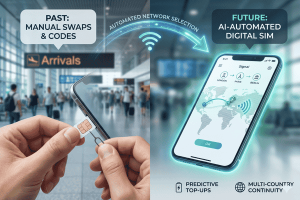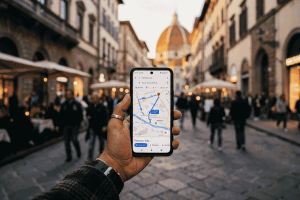
The rise of the digital sim has revolutionized how we stay connected across borders, making it easier than ever to land in a new country and have high-speed internet before you even step off the plane.
However, as with any tech shift, there are plenty of questions. Is your phone compatible? How do you install a plan without a physical card? Will your home number still work for WhatsApp and emergency calls? If you’ve been hesitant to make the jump from plastic to digital, you aren’t alone.
This comprehensive guide covers everything you need to know about the digital sim (or eSIM) and why it’s the ultimate travel hack for the modern explorer. From setup tips to cost comparisons, we’re breaking down the FAQs to ensure your next trip is as seamless as your connection.
What is a Digital SIM and Why is it Changing Travel?
To understand the digital sim, it’s helpful to look at where we started. For decades, the Subscriber Identity Module (SIM) was a physical piece of plastic that identified you to a network. As phones got thinner, SIM cards got smaller—from Mini to Micro to Nano. But the final evolution isn’t a smaller piece of plastic; it’s no plastic at all.
A digital sim, officially known as an eSIM (embedded SIM), is a tiny chip soldered directly onto your smartphone’s motherboard. Instead of switching physical cards to change your service provider, you simply download a digital profile onto this chip.
A Brief History of Connectivity
The technology was first introduced around 2016 in smartwatches and tablets, but it truly went mainstream when Apple, Samsung, and Google began integrating it into their flagship smartphones. By 2025, many new devices—including the latest iPhone models in the U.S.—have ditched the physical SIM slot entirely, moving toward an all-digital future.
Why Travelers Love It
For travelers, the context is clear: convenience. Traditionally, a multi-country trip through Europe or Asia meant collecting a pocketful of plastic cards. If you lost one, you lost your connection. With a digital sim, those profiles are stored securely in your phone’s software. You can store multiple profiles—one for home, one for Japan, one for France—and toggle between them with a few taps.
Furthermore, it eliminates the “airport tax.” Airport kiosks are notorious for selling overpriced “tourist SIMs” with limited data. By using a service like Terminal eSIM, you can browse and buy your plan from your couch, ensuring you get the best rates before you even pack your bags.
Practical Guide: How to Use a Digital SIM on Your Next Trip
Ready to make the switch? Using a digital sim is incredibly straightforward once you know the steps. Whether you’re an iPhone aficionado or an Android loyalist, the process follows a similar logic.
1. Verify Device Compatibility
Before you buy a plan, you must ensure your phone is “eSIM capable” and “carrier unlocked.”
- Check for eSIM: Most iPhones from the XR/XS onwards and Samsung S20 series or newer are compatible. A quick way to check on any phone is to dial *#06#. If you see an EID number, your phone supports digital SIM technology.
- Unlock Status: If you bought your phone on a payment plan from a carrier (like AT&T or Vodafone), it might be locked. Contact your carrier to ensure they’ve unlocked the device for use with other networks.
2. Purchase Your Plan
Visit a trusted provider like Terminal eSIM to select your destination. You can choose from:
- Local Plans: Specific to one country (e.g., Italy only).
- Regional Plans: Perfect for road trips (e.g., all of Europe or Southeast Asia).
- Global Plans: For the ultimate digital nomad covering 100+ countries.
3. Installation and Activation
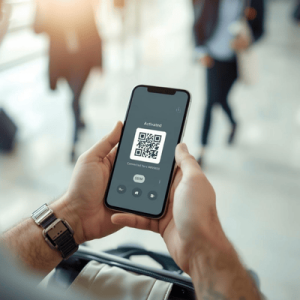
Once you purchase a digital sim, you will typically receive a QR code via email.
- For iPhone: Go to Settings > Cellular > Add eSIM and scan the QR code.
- For Android: Go to Settings > Network & Internet > SIMs > Add More and follow the prompts to scan.
Pro Tip: Install your eSIM while you still have a stable Wi-Fi connection at home or in the airport. You can keep the line “Off” until you land at your destination to save battery and data.
4. Managing Your Lines
The beauty of the digital sim is that it works with your physical SIM. You can set your home SIM for “Calls and SMS” (so you don’t miss important texts) and set your travel eSIM for “Cellular Data” to avoid those eye-watering roaming charges.
Comparison: Digital SIM vs. Physical SIM vs. Roaming
Choosing the right way to stay connected depends on your budget and how much you value your time. Below is a breakdown of how the digital sim stacks up against traditional options in 2025.
| Feature | Digital SIM (Terminal eSIM) | Local Physical SIM | International Roaming |
| Activation | Instant (QR Code) | Manual (Find a store) | Automatic |
| Cost | Low (Local rates) | Very Low | Extremely High ($10+/day) |
| Convenience | Excellent (Pre-travel setup) | Moderate (Wait in lines) | Excellent |
| Security | High (Can’t be stolen) | Low (Easily lost) | High |
| Multi-Country | Easy (Regional plans) | Hard (Swap cards) | Easy |
| Keep Home No. | Yes (Dual SIM mode) | No (Usually swap out) | Yes |
Key Insights
While local physical SIMs can sometimes be a few dollars cheaper, the digital sim wins on almost every other metric. The ability to maintain your primary number for WhatsApp or iMessage while using cheap local data for Google Maps and Instagram is a game-changer. Plus, you avoid the security risk of losing your original SIM card while fumbling with it in a crowded train station.
Trends, Problem-Solving, and Digital SIM FAQs
As we move deeper into 2025, the digital sim is becoming the standard. We are seeing a trend toward “Data Sharing” or “Hotspotting” being included in almost all plans, allowing you to power your laptop or your friend’s phone from your single connection. Additionally, travel insurance providers are starting to recommend eSIMs as a safety measure, ensuring travelers are never “offline” in an emergency.
Here are the most common questions travelers ask before switching:
Does a digital sim come with a phone number?
Most travel-specific eSIMs are data-only. This means you won’t get a local number to make traditional landline calls. However, you can still use WhatsApp, FaceTime, Skype, or Messenger to make calls over the data connection. If you absolutely need a local number, look for “Voice & Data” specific plans.
What happens if I delete my digital sim by accident?
If you accidentally remove the eSIM profile from your settings, you generally cannot just “re-scan” the same QR code for security reasons. You would need to contact the support team at Terminal eSIM to have your profile reissued. Always keep your confirmation email handy!
Can I use my digital sim in multiple devices?
Unlike a physical card that you can move from an iPhone to an iPad, a digital sim is usually locked to the device it was first activated on. If you want data on multiple devices, the best solution is to use the “Personal Hotspot” feature on your phone.
Will I still get charged roaming by my home carrier?
Only if you leave your home SIM’s “Data Roaming” toggle turned on. To be safe, go to your cellular settings and ensure that your home line has “Data Roaming” set to OFF, while your digital sim line has it set to ON.
Summary: Is the Switch Worth It?
The transition to digital sim technology is no longer a futuristic concept—it is the current reality for global travel. By choosing a digital option, you eliminate the stress of finding connectivity upon arrival, save significantly compared to traditional roaming fees, and keep your hardware secure inside your phone.
Key takeaways for your next trip:
- Check compatibility before you fly.
- Buy regional plans if you are visiting multiple countries.
- Install early to hit the ground running.
- Use Dual SIM mode to keep your home number active for texts while using eSIM for data.
Whether you are a weekend warrior or a full-time digital nomad, the digital sim offers a level of freedom that physical cards simply can’t match.
Experience Seamless Connectivity with Terminal eSIM
Don’t let expensive roaming bills or the hassle of physical SIM cards dampen your travel spirit. At Terminal eSIM, we specialize in providing high-speed, reliable data plans for over 150 destinations worldwide. Our platform is designed for the modern traveler who values speed, security, and simplicity.
Why choose Terminal eSIM?
- No Hidden Fees: Pay for the data you need, with no surprise charges.
- Instant Delivery: Receive your QR code via email seconds after purchase.
- 24/7 Support: Our team is always ready to help you get connected.
- Stay Flexible: Choose from daily, weekly, or monthly bundles tailored to your itinerary.
Ready to upgrade your travel experience? Experience the future of global connectivity today.