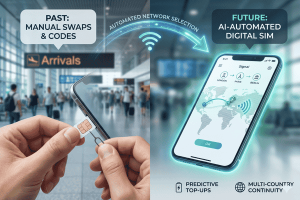
You would land, find a kiosk, haggle over a local plastic card, and pray you didn’t lose your home SIM in the process.
Today, the landscape has shifted entirely. With the rise of eSIM compatible phones, staying connected is now as simple as scanning a QR code before you even board your flight. But does your specific device support this digital revolution? Whether you are a loyal iPhone user or a dedicated Android fan, understanding how your phone interacts with international networks is the key to a stress-free journey.
In this guide, we will break down exactly how to check if your device is ready for the world, explore the growing list of esim compatible phones, and show you how Terminal eSIM can transform your next adventure into a seamless, high-speed experience.
The Evolution of Connectivity: What is an eSIM?
To understand if your phone works abroad, we first need to look at the “e” in eSIM: Embedded. Unlike the traditional physical SIM cards we’ve used for decades, an eSIM is a small chip soldered directly onto your phone’s motherboard.
A Brief History of the SIM
Since the 1990s, the Subscriber Identity Module (SIM) has shrunk from the size of a credit card to the “Nano” chips we see today. However, the physical nature of these cards created a bottleneck for travelers. If you wanted to switch carriers, you had to switch cards.
In 2018, Apple and Google began integrating eSIM technology into flagship models like the iPhone XR and the Pixel 3. By 2026, this technology has become the industry standard. Many newer devices, particularly those sold in the United States, have ditched the physical SIM slot entirely, moving toward an “eSIM-only” future.
Why It Matters for International Travel
The primary advantage of having one of the many esim compatible phones available today is Dual SIM functionality. Most modern smartphones allow you to keep your physical SIM (your home number) active for calls and texts while using an eSIM for affordable local data.
- No more roaming shock: You won’t return home to a $500 bill from your domestic provider.
- Instant Activation: You can buy a plan for Japan while you’re still in London.
- Space Saving: Manufacturers can use the space saved by removing SIM trays to add larger batteries or better cooling systems.
For the modern traveler, an eSIM isn’t just a luxury; it’s a digital passport to the local internet.
How to Check for eSIM Compatible Phones: A Practical Guide
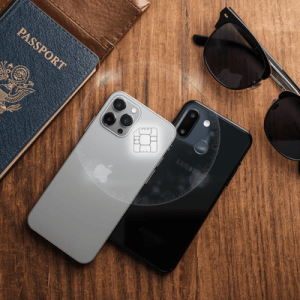
Not every smartphone is built the same. While most “Flagship” phones released after 2020 are esim compatible phones, there are regional variations and carrier locks to consider. Here is how you can verify your device’s status in under 60 seconds.
1. The “Dial Code” Shortcut (Works for most Android & iPhone)
The fastest way to see if your hardware supports eSIM is to check for an EID (Embedded Identity Document) number.
- Open your phone’s Dialer/Phone app.
- Type in *#06#.
- A screen will pop up with your IMEI numbers. If you see a code labeled “EID,” your phone is equipped with an eSIM chip.
2. Checking iPhone Compatibility
Apple has been the biggest driver of eSIM adoption. To check manually:
- Go to Settings > General > About.
- Scroll down to the “Available SIM” or “Digital SIM” section. If you see an IMEI listed there, you’re good to go.
- Pro Tip: Look at “Carrier Lock.” It must say “No SIM restrictions” to use a travel eSIM from Terminal eSIM.
3. Checking Android Compatibility (Samsung, Pixel, etc.)
Because Android is open-source, the menus might look slightly different depending on your brand.
- Samsung Galaxy: Settings > Connections > SIM Manager. Look for “Add eSIM.”
- Google Pixel: Settings > Network & Internet > SIMs > “+ Add.”
- Other Brands: Search for “SIM” or “eSIM” in your Settings search bar.
Important Note on Regional Restrictions
Even if a model is generally on the list of esim compatible phones, some versions are restricted:
- Mainland China/Hong Kong: Most iPhones sold here do not have eSIM; they have two physical SIM slots instead.
- Carrier Locked: If you are still paying off your phone via a contract (e.g., AT&T, Verizon, or T-Mobile), your carrier might have “locked” the eSIM slot. You may need to contact them to unlock it for international use.
Comparison: Top eSIM Compatible Phones for 2026
Choosing the right device for travel involves looking at battery life, frequency band support, and how many eSIM profiles the device can store. Below is a breakdown of the most popular esim compatible phones used by travelers today.
| Device Series | eSIM Support | Multi-Profile Support | Best For |
| iPhone 14, 15, 16, 17 | Yes (eSIM-only in US) | Up to 8+ profiles | Frequent flyers & Apple ecosystem users. |
| Samsung Galaxy S21 – S26 | Yes | 2-5 profiles | Business travelers needing robust security. |
| Google Pixel 6 – 10 | Yes | 5+ profiles | Digital nomads who want the “cleanest” Android experience. |
| iPad Pro / Air (M-Series) | Yes | Multiple profiles | Remote workers and long-haul travelers. |
| Motorola Razr / Edge | Yes | 2 profiles | Budget-conscious travelers looking for flagships. |
Key Insights from the Comparison
- iPhone Dominance: Apple devices currently offer the most “slots” for eSIMs. While you can only use one or two at a time, you can store nearly a dozen, making it easy to toggle between your “France Plan,” “USA Plan,” and “Global Plan.”
- Android Versatility: High-end Android phones often support a “Hybrid” setup, allowing one physical SIM and one eSIM to work simultaneously. This is perfect for those who still use a local physical SIM for long-term stays but want an eSIM for quick transitions.
- Travel-Ready Tablets: Don’t forget that many iPads and Samsung Tabs are also esim compatible phones (in spirit), allowing you to have a dedicated data connection on your tablet without relying on spotty hotel Wi-Fi.
Trends, Troubleshooting, and Frequently Asked Questions
As we move through 2026, the trend is clear: physical SIM cards are becoming legacy technology. Industry forecasts suggest that over 600 million eSIM-capable devices will ship this year alone. However, with new technology comes new questions.
Common Troubleshooting Tips
If you have confirmed you have one of the many esim compatible phones but can’t get it to work abroad, check these three things:
- Data Roaming: You must turn “Data Roaming” ON for your eSIM line in settings, but keep it OFF for your primary home line to avoid fees.
- APN Settings: Most eSIMs (like those from Terminal eSIM) configure automatically. If not, you may need to manually enter the “Access Point Name” provided in your installation instructions.
- Network Selection: In some remote areas, your phone might struggle to find a signal. Try turning off “Automatic Network Selection” and manually choosing a local carrier.
Frequently Asked Questions (FAQs)
Q: Can I use WhatsApp if I switch to an eSIM? A: Absolutely. WhatsApp is tied to your phone number, not your SIM card. When you install an eSIM for data, WhatsApp will ask if you want to keep your current number. Simply say “Yes,” and you can continue chatting as usual.
Q: Do I lose my home phone number? A: No. Your home number stays on your physical SIM (or your primary eSIM). You are simply adding a second “lane” of data for your trip.
Q: Can I move my eSIM from an old phone to a new one? A: Generally, eSIMs are one-time use for security reasons. However, many providers and modern OS versions (like iOS 18+) are beginning to support “eSIM Quick Transfer.”
Q: Are eSIMs more expensive than local SIMs? A: In the past, yes. But in 2026, the price gap has closed. Providers like Terminal eSIM offer competitive rates that are often cheaper than the “tourist SIMs” sold at airports, with the added benefit of not having to wait in line.
Summary of eSIM Compatibility
Navigating international connectivity doesn’t have to be a headache. If you own an iPhone XS or newer, a Google Pixel 3 or newer, or a Samsung S20 or newer, you likely already have one of the world’s many esim compatible phones.
To recap:
- Check for EID: Dial *#06# to see if your hardware is ready.
- Unlock Your Phone: Ensure your carrier has not restricted your device to a single network.
- Dual-SIM is King: Keep your home number for emergencies and use a digital plan for your heavy lifting (maps, social media, streaming).
- Global Standard: By 2026, eSIM is the preferred method for over 70% of international travelers due to its security, ease of use, and environmental benefits.
Experience the Future of Travel with Terminal eSIM
Knowing you have one of the many esim compatible phones is only the first step. The next step is choosing a partner that ensures you actually stay connected when it matters most.
At Terminal eSIM, we’ve built a platform specifically for the modern wanderer. Whether you’re a digital nomad hopping between European capitals, a business traveler heading to Tokyo, or a family on a once-in-a-lifetime safari, we provide high-speed 4G and 5G data in over 200 destinations.
Why Choose Terminal eSIM?
- Instant Delivery: Get your QR code via email the second you purchase.
- Budget Friendly: No hidden fees or daily roaming charges. Pay only for the data you need.
- Reliability: We partner with the best local networks in every country to ensure you never lose a signal in a strange city.
- 24/7 Expert Support: Our team knows esim compatible phones inside and out, so we’re always here to help.
Don’t let expensive roaming or physical SIM cards hold you back. Check your device, pick your destination, and travel with confidence.
Ready to get connected? Explore Terminal eSIM Plans and start your journey today!