Picture this: You just landed at Haneda Airport in Tokyo, or perhaps you’re navigating the winding stone streets of Rome. You bought an esim unlimited data plan before you left, confident that you could stream maps, upload photos, and translate menus without watching a data meter.
But instead of a robust connection, you’re greeted by a spinning loading wheel, a frustratingly slow 3G icon, or worse—no signal at all.
As digital nomads and frequent travelers, we have faced this exact situation more times than we care to admit. The truth is, while digital SIM cards have completely revolutionized how we stay connected abroad, the phrase “unlimited data” often comes with a few real-world strings attached.
When your data drops or slows to a crawl, it can ruin a travel day. Fortunately, most problems come down to a few common settings or network miscommunications. Let’s dive into why your esim unlimited data plan might be acting up and exactly how to fix it on the fly.
1. The Myth of the “True” Unlimited Plan: Throttling & FUP
Before changing any settings on your phone, you need to understand how international data works. Many travelers buy an esim unlimited data pack from popular marketplaces like Holafly or Nomad, assuming it behaves like their home home internet.
In reality, almost all travel eSIMs operate under a Fair Usage Policy (FUP).
What is Fair Usage Policy?
When a travel provider sells you an unlimited plan, they are renting bandwidth from local cellular networks (like SoftBank in Japan or Vodafone in Europe). To prevent single users from overwhelming the local towers by downloading 4K movies or torrenting files, the network will throttle your speeds once you hit a certain daily threshold—usually between 1GB and 3GB of high-speed data.
If you notice your connection dramatically drops to 2G or 3G speeds late in the afternoon, you haven’t broken your digital SIM; you’ve likely been throttled.
- The Fix: Uncheck “Low Data Mode” in your settings, minimize heavy video streaming on cellular networks, and let your phone do its heavy app updates only when connected to hotel Wi-Fi. If you consistently hit these walls, providers like Terminal eSIM offer highly transparent regional plans that make it easy to see exactly what you are paying for without hidden speed traps.
2. Why Your Unlimited Data Isn’t Working (And How to Fix It)
If your data isn’t just slow, but completely non-functional, run through this practical checklist. These are the most common culprits we encounter in the field.
Problem A: Data Roaming is Turned Off
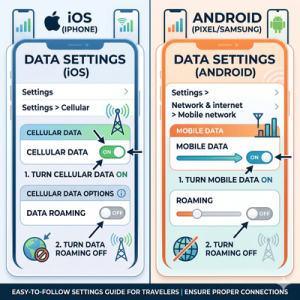
This is the number one reason an activated profile refuses to load web pages. Because your travel card is technically from a foreign provider routing data through a local partner network, your phone views this relationship as “roaming.”
- How to Fix It on iPhone: Go to Settings > Cellular > Select your travel eSIM profile > Toggle Data Roaming to ON.
- How to Fix It on Android: Go to Settings > Network & Internet > SIMs > Select your digital SIM > Toggle Roaming to ON.
Problem B: The Wrong Data Line is Selected
Your phone can hold multiple profiles, but it can only use one for cellular data at a time. If your device is still trying to draw data from your home carrier (T-Mobile, Verizon, or EE), you won’t get any internet unless you pay exorbitant roaming fees to your home network.
- The Fix: Navigate to your cellular settings and ensure that the “Default Voice Line” stays on your primary home number (so you get important text alerts), but change the “Cellular Data” line exclusively to your newly installed travel plan.
Problem C: Misconfigured APN Settings
An APN (Access Point Name) is essentially the gateway your phone uses to connect to a specific mobile network. Most modern profiles configure this automatically during installation. However, providers like Ubigi or Airalo occasionally require you to input this info manually, especially on older Android devices.
- The Fix: Check the activation email or app dashboard from your provider. If they list an APN name (for example: globaldata), go to your profile’s network settings, look for “Access Point Names,” and type it in exactly as written.
3. Realities of Travel eSIMs: A Balanced Breakdown
Every piece of travel tech has its trade-offs. To help you plan your next trip properly, here is an honest look at what to expect when choosing an esim unlimited data structure over fixed-allotment options.
Pros
- No Bill Shock: You pay one upfront price. Even if you hit an FUP throttle limit, you won’t suddenly find a $500 roaming charge on your credit card.
- Excellent for Basic Navigation: Even when throttled, unlimited plans usually provide enough speed for Google Maps, Uber, and WhatsApp text messages.
- Convenience: You can buy a plan while sitting at your departure gate and land with data already functional, skipping the airport kiosk lines entirely.
Things to Know
- Tethering Restrictions: Many unlimited plans strictly forbid or limit personal hotspots. If you plan to run a laptop for remote work, a fixed data plan (like a 10GB or 20GB bucket) is almost always a better choice because it permits unrestricted hotspotting.
- Local Network Prioritization: During major sports events, concerts, or in crowded tourist hubs, local contract customers get priority tower bandwidth. Your roaming data might lag simply because the local network is congested.
- Battery Drain: When your phone switches between different local roaming partners trying to find the strongest signal, it uses significantly more battery power than usual.
4. How to Choose the Right Plan for Your Trip
Not all travel profiles are built the same way. If you are choosing between providers, think about how you actually travel:
| Travel Scenario | Best Choice | Why? |
| The City Sightseer (Maps, Uber, Translators) | Unlimited Data Plan | High convenience, low risk of running out mid-transit. |
| The Digital Nomad (Zoom calls, Laptop tethering) | Fixed Volume Plan (e.g., 20GB) | Allows unrestricted hotspot use and guarantees maximum speeds. |
| The Backpacker (Crossing multiple borders) | Regional/Global Plan | Keeps you on one profile across dozens of countries. |
If you value straightforward, no-nonsense options, the Terminal eSIM app is a great tool to keep on your phone. Instead of burying network rules in fine print, it lays out local carrier networks clearly, making it easy to see exactly what kind of coverage you’re purchasing before you buy.
5. Frequently Asked Questions
Why is my unlimited data plan so slow?
Most likely, you have exceeded the high-speed daily allotment dictated by the network’s Fair Usage Policy. The network slows your connection down temporarily to preserve bandwidth for local users. It typically resets at midnight local time.
Can I share my eSIM unlimited data via hotspot?
It depends entirely on the provider. Many unlimited plans block tethering entirely to prevent users from connecting multiple laptops. If you absolutely need a hotspot, double-check the plan terms or purchase a fixed-gigabyte plan instead.
Do I need to delete my home SIM card profile?
No! You can keep your physical or digital home SIM active alongside your travel profile. Just ensure that data roaming is turned off on your home line so you aren’t charged accidental roaming fees by your domestic carrier.
Making Your Next Trip Seamless
Dealing with network drops when you are trying to find your hotel is stressful. By understanding data roaming toggles, keeping an eye on your APN settings, and managing your heavy data usage on hotel Wi-Fi, you can keep your esim unlimited data running smoothly across the globe.
Before you head out on your next international adventure, consider downloading Terminal eSIM. It’s a clean, reliable alternative designed by travelers who understand exactly how frustrating a dropped signal can be. Safe travels!