Whether you’re preparing for a business trip, family vacation, or a global adventure, understanding how to activate your eSIM service efficiently ensures you’re always online and in control.
This guide is your passport to instant connectivity. We will walk you through everything you need to know about getting your eSIM service up and running. From understanding the basics of how this technology works to a step-by-step activation process that takes less than five minutes, we’ve got you covered. You’ll learn how to choose the right plan, what to do if you run into issues, and why an eSIM from a provider like Terminal eSIM is a game-changer for modern travelers. Say goodbye to connectivity hassles and hello to seamless, affordable data wherever your adventures take you.
What Exactly is an eSIM and How Does it Work?
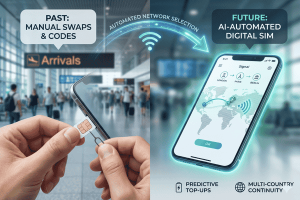
The concept of a SIM card is familiar to anyone who has owned a mobile phone. That small, removable chip holds your identity with a mobile network, allowing you to make calls, send texts, and use data. For years, the physical SIM card has been the standard. However, as devices become slimmer and more integrated, the need for a more streamlined solution has grown. Enter the eSIM.
An eSIM performs the exact same function as a traditional SIM card, but it’s embedded directly into your phone’s motherboard during manufacturing. Think of it as a rewritable SIM card that you can’t lose. Instead of physically swapping cards when you change carriers or travel to a new country, you simply download a new “eSIM profile” onto your device. This profile contains all the information your phone needs to connect to a specific network. The process is entirely digital, managed through your phone’s settings.
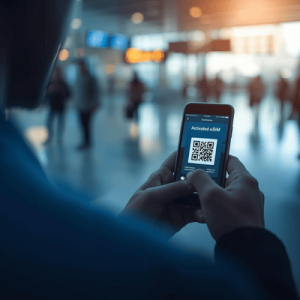
For example, a traveler heading from the United States to Japan can purchase a Japanese data plan online from a provider like Terminal eSIM before they even leave home. They receive a QR code via email, scan it with their phone’s camera, and follow a few simple on-screen prompts. The new eSIM profile is installed alongside their primary SIM, and upon landing in Japan, they can switch to the Japanese eSIM for instant, affordable data while still being able to receive calls and texts on their home number. This dual-SIM capability is a major advantage, offering flexibility that physical SIMs often can’t match.
Your Quick Guide to Activating an eSIM Service
Getting your eSIM service ready for your next trip is incredibly fast and straightforward. The entire process, from purchase to activation, can be completed in just a few minutes from the comfort of your home. Follow these simple steps to unlock instant global connectivity.
First, you need to ensure your device is eSIM-compatible. Most smartphones released in the last few years, including recent models of iPhones, Google Pixels, and Samsung Galaxy devices, support eSIM technology. A quick search for your device model and “eSIM compatibility” will give you a definite answer.
Once you’ve confirmed your device is ready, it’s time to choose and purchase your plan.
- Choose Your Destination and Plan: Visit a provider like Terminal eSIM. Select the country or region you are traveling to and browse the available data plans. Choose the one that best fits the length of your trip and your expected data usage.
- Complete Your Purchase: Add the plan to your cart and complete the checkout process. You will receive an email almost instantly containing your activation details, usually in the form of a QR code.
- Install Your eSIM: Open your phone’s settings and find the mobile or cellular data section.
- On an iPhone, go to Settings > Cellular > Add eSIM.
- On an Android device, this is often under Settings > Network & Internet > SIMs > Add a SIM.
- Scan the QR Code: Your phone will prompt you to scan the QR code from your confirmation email. Point your camera at the code, and your device will automatically recognize the eSIM profile. You can also choose to enter the activation details manually if needed.
- Label and Activate: Follow the on-screen prompts to label your new eSIM (e.g., “Europe Trip” or “Terminal eSIM”). You can then choose its role—whether it’s for data only or for calls and texts as well. It’s best to wait until you arrive at your destination to fully switch over to the eSIM for data to avoid any unintended charges and to ensure your plan’s validity starts upon use.
That’s it! In under five minutes, you have successfully installed a new line on your phone, ready for your travels.
Comparing Connectivity Options: eSIM vs. Physical SIM vs. Roaming
When traveling, staying connected is essential. Traditionally, you had three main options: using your home provider’s international roaming, buying a local physical SIM card, or relying on Wi-Fi. The eSIM introduces a fourth, often superior, alternative. Here’s a comparison to help you understand the key differences.
| Feature | eSIM (e.g., Terminal eSIM) | Local Physical SIM | International Roaming |
| Activation | Instant digital setup via QR code before you travel. | Requires finding a store, purchasing, and physically installing the card. | Usually automatic, but must be enabled with your home carrier. |
| Cost | Highly competitive and transparent. Pay only for the data you need. | Generally affordable, but can have hidden fees or require a local ID. | Extremely expensive, with high per-MB data rates and daily fees. |
| Convenience | The best. No need to remove your primary SIM. Manage multiple plans digitally. | Inconvenient. You must swap out your primary SIM, risking loss or damage. | Convenient upon arrival, but setup beforehand can be complex. |
| Flexibility | Excellent. Switch between plans and providers easily from your phone. | Limited. Tied to one provider until you buy a new card. | Limited. Tied to your home provider and their partner networks. |
| Phone Number | Keep your primary number for calls/texts while using the eSIM for data. | You get a new, local phone number, losing access to your primary one. | You keep your primary phone number for all services. |
In summary, while international roaming offers convenience, its high cost makes it impractical for most travelers. Local physical SIMs are more affordable but come with the hassle of finding a vendor and swapping cards. The eSIM, particularly from a dedicated travel provider like Terminal eSIM, combines the best of both worlds: it offers the convenience of instant activation with the affordability of local rates, all without forcing you to give up your primary SIM. This makes it the clear winner for modern travelers seeking a blend of cost-effectiveness, flexibility, and ease of use.
Common Questions and Solutions for eSIM Travelers
As eSIM technology becomes more popular, travelers naturally have questions about how it works in the real world. From compatibility concerns to troubleshooting on the go, understanding the common issues can ensure a smooth experience. Here, we address some frequently asked questions and offer practical solutions.
FAQs About Using an eSIM Service
- What happens if I lose my phone? Is my eSIM secure?
Your eSIM is more secure than a physical SIM. Since it’s embedded in your device, it cannot be removed and put into another phone. Your eSIM profile is protected by your phone’s security features, like its passcode or biometric lock. If you lose your phone, you should contact your eSIM provider to deactivate the plan, just as you would with a physical SIM. The digital nature means a thief cannot simply take your SIM and use your service. - Can I use my eSIM on multiple devices?
No, an eSIM profile is tied to the specific device it’s installed on. Once you activate an eSIM using a QR code on one phone, that specific plan cannot be transferred to another device. If you get a new phone, you will need to purchase and install a new eSIM plan for that device. This is a security measure to prevent unauthorized use of your plan. - What should I do if my eSIM is not connecting to a network?
If you arrive at your destination and your eSIM isn’t working, don’t panic. Here are a few troubleshooting steps:
- Check Activation: Make sure you have turned on the eSIM line in your phone’s cellular settings and selected it for mobile data.
- Enable Data Roaming: In your eSIM’s settings, ensure that “Data Roaming” is turned on. While this sounds counterintuitive, it’s necessary for the eSIM to connect to local partner networks. You will not be charged extra, as you are using a prepaid plan.
- Restart Your Device: A simple reboot can often resolve minor connectivity issues by forcing the phone to search for available networks again.
- Manually Select a Network: In your cellular settings, you can try to manually select a network from the list of available providers supported by your eSIM plan.
- Can I top up my eSIM plan if I run out of data?
Yes, most eSIM providers, including Terminal eSIM, offer the ability to top up your existing plan or purchase a new one if you need more data. This can typically be done directly through the provider’s website or app, giving you the flexibility to add data on the fly without needing a new QR code.
The Future of Travel Connectivity is Here
The days of stressful airport searches for a SIM card or shocking roaming bills after a trip are quickly becoming a thing of the past. The rise of the eSIM has fundamentally changed how we connect while abroad, offering a solution that is simple, affordable, and powerful. We’ve walked through what an eSIM is, from its digital-first design to its practical advantages over traditional options like physical SIMs and expensive international roaming plans.
We covered the incredibly straightforward, five-minute process to get your eSIM service activated: check compatibility, pick a plan, scan a QR code, and you’re set. The comparison made it clear that for the modern traveler, the eSIM strikes the perfect balance between the convenience of roaming and the affordability of a local SIM. We also tackled common concerns, providing you with the knowledge to troubleshoot any minor issues and travel with confidence. The key takeaway is that eSIM technology puts control back in your hands, allowing you to manage your connectivity needs digitally and efficiently.
Stay Connected Effortlessly with Terminal eSIM
For the digital nomad hopping between continents, the family on a week-long vacation, or the business traveler attending an international conference, reliable internet is non-negotiable. An eSIM is more than just a piece of technology; it’s a tool that empowers you to travel smarter. It eliminates the friction of staying connected, giving you more time to focus on what truly matters: enjoying your journey. With an eSIM, you land with the peace of mind that instant, high-speed data is just a tap away.
Ready to experience the freedom of seamless global connectivity? Terminal eSIM offers affordable, reliable data plans for hundreds of destinations worldwide. Our easy-to-use platform ensures you can get your eSIM service set up in minutes, so you can travel without boundaries. Explore our plans today and make connectivity worries a thing of the past.